Run your school office from one hub
Student records, fees ledger, grades, attendance, and role-based access for your staff. Parent portal with MoMo payments included. Built for Ghana private schools — Basic to SHS.
Built for how Ghana schools actually work
Scattered systems & manual tracking
Student records in Excel, fees on WhatsApp, grades on paper, no central source of truth
One system for the whole school
Students, classes, attendance, grades, fees, reports. Staff login. Parents login. All connected.
Headmaster sees
Bursar sees
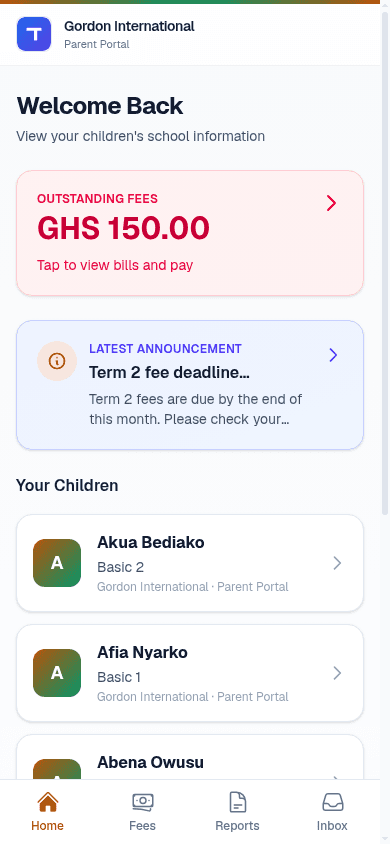
Parent sees (portal login)
Why TavlaHub, not the rest
Built for Ghana schools. No vendor lock-in. Honest pricing.
Complete SIS
Students, classes, attendance, grades, reports, fees — all modules connected.
Clear role walls
5 staff roles. Teachers see grades. Bursars see fees. No confusion.
Your Paystack keys
School-owned payment account. We never touch your money. MoMo goes direct.
Honest pricing
Annual rates, public. No contact-us games. No hidden per-student traps.
All the modules you need
Complete student information system. Every module works together.
Students, Classes & Roles
- Student records & profiles
- Class rosters & assignments
- Guardian directory
- 5 staff roles (Owner, Admin, Bursar, Teacher, Admissions)
Attendance & Academics
- Daily attendance tracking
- Grades & subjects
- Report card generation
- Class timetables
Fees & MoMo Collections
- Parent portal MoMo payments
- School's Paystack account
- Arrears dashboard
- Receipt generation
Leave & Transfer Tracking
- Student status tracking
- Leave date records
- Portal access control
- Historical records preserved
Parent Portal & Student Portal
- Phone browser access (PWA)
- View fees & report cards
- Receive announcements
- No app store download needed
Admin Dashboard (Web)
- Desktop for office staff
- Live metrics dashboard
- Settings & configuration
- User management
Clear annual pricing
No monthly guesswork. No per-student trap. Just honest Hybrid C rates.
Core
GHS 5,000
per year
Growth
GHS 10,000
per year
Scale
GHS 18,000
per year
+ GHS 35 per student beyond tier cap · IB add-on: GHS 5,000/yr
See full pricing breakdownCommon questions from Ghana school owners
How do parents pay school fees through their phone?
Parents receive an invite link to access their student's fees on their phone browser. They can pay directly via MoMo (MTN, Vodafone, AirtelTigo) through your school's own Paystack account. No app store download needed - it works right in their browser and can be saved to their home screen.
Do we need to stop chasing fees on WhatsApp completely?
TavlaHub automates fee reminders and payment tracking, so your bursar spends less time manually messaging parents on WhatsApp. Parents can see outstanding balances in real-time and pay directly through MoMo, with instant receipt confirmation to your office.
What are the different user roles for our staff?
TavlaHub has 5 role walls: Owner (full access), Admin (operational management), Bursar (fees and payments only), Teacher (grades and attendance), and Admissions (student records and enrollment). Each role sees only what they need, enforced at the database level for security.
How much does it cost per year?
Hybrid C annual pricing: Core GHS 5,000/year (up to 150 students), Growth GHS 10,000/year (up to 400 students), Scale GHS 18,000/year (up to 800 students). If you exceed your tier cap, it's GHS 35 per extra student per year. IB Assessment Pack add-on is GHS 5,000/year. Optional TavlaHub Care support is GHS 200/month.
Can parents use the app without downloading from App Store or Play Store?
Yes. The parent portal works in any phone browser (iPhone Safari, Android Chrome). Parents can "Add to Home Screen" to get an app-like icon and experience, without needing app store approval or phone storage. This is called a Progressive Web App (PWA) and it works everywhere instantly.
What happens when a student leaves or transfers?
TavlaHub tracks leave dates and transfer reasons. When you mark a student as "Left" or "Transferred", their record is preserved with full history but they stop appearing in active class rosters. You can always search historical records for audit or reference.
Ready to run your school operations in one system?
Book a 10-min demo. See students, attendance, grades, fees, and parent portals working together.